ML & AI image analysis
Classify subjects and scenes, generate descriptions, and find images matching a text query or reference photo. Evaluate the results against your research brief.
Example: A visual brief → relevant images ranked for review.

PixelPeeper / For business
Visual intelligence at scale. Find relevant photos, analyze their content, and extract the data behind them—with ML and AI that turn hours of manual research into a repeatable workflow.
Your question. Your sources. A workflow built around the answers you need.
Inside PixelPeeper / Actual image analysis
See what our image analysis and metadata tools reveal about the same photograph.
AI-inferred
Subjects, suggested object regions, and generated descriptions.
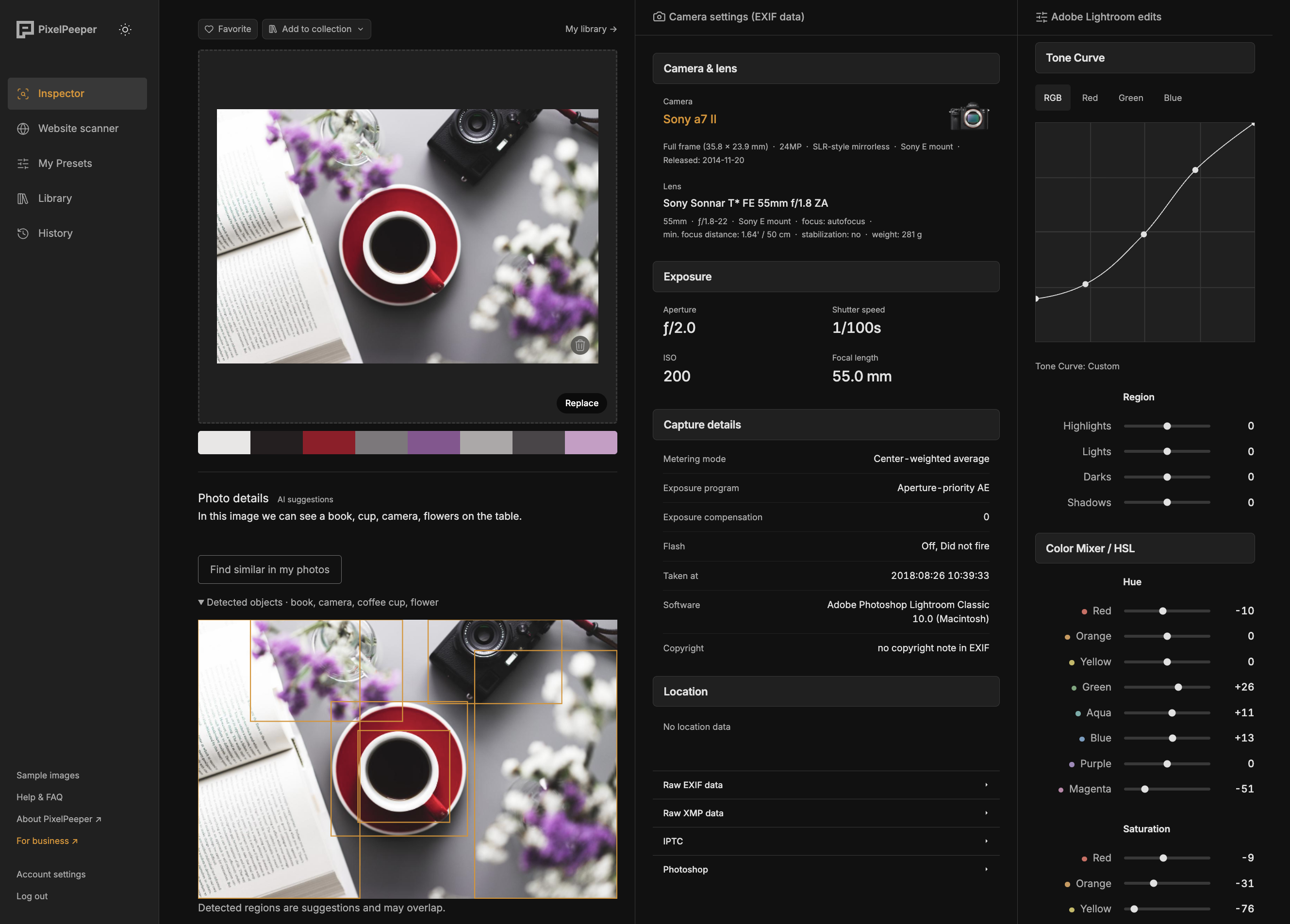
Calculated from pixels
Dominant colors extracted from the image.
Embedded metadata
Camera, lens, exposure, and timestamps when present in the file.
Embedded metadata
Saved tone curves and color adjustments when Lightroom metadata is present.
01 / From images to answers
Bring a research question and the websites or images you want to investigate. Combine collection, visual analysis, and metadata extraction in one repeatable process.
Classify subjects and scenes, generate descriptions, and find images matching a text query or reference photo. Evaluate the results against your research brief.
Example: A visual brief → relevant images ranked for review.
Extract available camera, lens, exposure, and editing metadata into consistent fields. Keep embedded facts separate from model estimates.
Example: A research sample → camera, lens, and exposure data where available.
Collect photos from an agreed set of websites instead of opening and saving them one by one. Retain source links so findings can be traced back to the original pages.
Example: A list of websites → collected images and source URLs.
Design the output around your existing tools: structured exports for a one-off project, or a custom API for an ongoing workflow.
Example: New images → structured JSON for your research tools or application.
Research in practice
InputYour image library and any existing folders, tags, or categories.
OutputAn index of all your images, labeled and classified by their visual content. Search in natural language for what’s in them, and find duplicates and visually similar versions.
InputYour product image library or store URLs, plus your catalog categories and preferred terminology.
OutputSuggested product categories, visual attributes such as color and material, and image descriptions for your team to review and use in your catalog.
InputA list of photography websites and a brief describing the portraits you want.
OutputA shortlist of matching photos, with source URLs, generated descriptions, and camera settings where available.
InputProduct-page URLs from your store, with all images grouped by listing.
OutputProducts with no detected model in their photos, linked to their listings and image sets for your team to review.
InputA set of interior photographs with any embedded camera metadata.
OutputA table of available focal lengths and camera models, filtered to your agreed definition of wide-angle. Photos with missing metadata are marked separately.
InputYour image library or website URLs, plus any available license and source records.
OutputImages flagged for review based on embedded copyright notices, visible watermarks, or missing license records, with the supporting details linked to each file.
InputYour image library, uploaded submissions, or website URLs to scan.
OutputImages flagged as potentially AI-generated, with detection scores and source links for review. Scores are estimates, not proof of how an image was created.
Receive results as CSV or JSON, or scope a custom API integration.
02 / Research you can automate
Find the relevant images
Search across a defined set of websites or images for the subjects and visual characteristics that matter to your project.
Analyze a research sample
Replace repetitive image inspection with a batch workflow designed around your research question.
Repeat the research
Once a pilot delivers useful results, scope an integration or recurring research around new inputs.
03 / From a question to a workflow
Start with the question you want to answer. We use a representative sample to test the analysis, review the findings with you, and agree a repeatable process before scaling up.
Custom projects & integrations
Share the research you’re doing by hand, the websites or images involved, and the result you need. We’ll scope a pilot around that task, with clear outputs and a price agreed upfront.
Discuss your project ↗Or email help@pixelpeeper.com
Based on source coverage, image volume, analysis requirements, and delivery needs.
Pricing and deliverables agreed before work begins.